


How to Build LinkedIn Presence as a Student in 2026 (Without Posting Daily)
The system that gets students hired without posting daily
8 min read
Share this post
Summarize with AI

Build real LinkedIn presence as a student by posting 2-3 times per week with a repeatable content system and AI tools — under 1 hour of weekly effort, under $1/month.

TL;DR: You can build a real LinkedIn presence as a student by posting 2-3 times per week with a repeatable content system — not by grinding out daily posts. The students landing internships and job offers from LinkedIn in 2026 aren't spending hours writing. They're using AI tools to generate posts from their own voice samples and scheduling them on autopilot, often for less than $1/month.
The "I Should Be Posting on LinkedIn" Problem
You're scrolling LinkedIn and see classmates posting thought leadership about their summer internship. Someone from your program just shared a carousel about "5 Things I Learned in My Data Science Course" and it has 4,000 impressions.
Meanwhile, you haven't posted in three months.
You know LinkedIn matters. 87% of recruiters use LinkedIn to evaluate candidates, according to Jobvite's 2025 Recruiting Survey. Students with active profiles receive 3x more recruiter messages than those with just a filled-out bio.
But here's the thing nobody tells you: the students crushing it on LinkedIn aren't spending hours each week writing posts. Most of them have a system. And in 2026, that system mostly runs itself.
Why LinkedIn Presence Matters More for Students Now Than Ever
Three things changed in the last two years.
Hiring managers check your LinkedIn before your resume. A 2025 LinkedIn Talent Solutions report found that 61% of hiring managers said a candidate's LinkedIn activity influenced their decision to interview. Not just the profile — the activity.
AI flooded the platform with generic content. Which means authentic student voices actually stand out more. If you post something real about what you're learning, it cuts through the AI-generated thought leadership slop.
The algorithm rewards consistency over virality. LinkedIn's 2026 algorithm update prioritizes accounts that post regularly over accounts that occasionally go viral. Two posts per week from a student account now outperforms one viral post per month.
The Minimum Viable LinkedIn Strategy for Students
Here's what actually works. I tested this across my last two semesters and went from 200 connections and zero engagement to 2,800 connections and consistent recruiter DMs.
Post Frequency: 2-3 Times Per Week
Daily posting is unnecessary and unsustainable when you have classes, assignments, and maybe a part-time job. Research from Shield Analytics (a LinkedIn analytics platform) shows diminishing returns after 3 posts per week for accounts under 5,000 followers.
Two to three posts per week is the sweet spot. Enough to stay visible. Not so much that you burn out by week three.
Content Pillars: Pick Three Topics
You don't need to talk about everything. Pick three topics you can rotate between:
- What you're learning — Course projects, certifications, books, new skills
- What you're building — Side projects, hackathon entries, portfolio pieces
- What you're observing — Industry trends, tools you've tried, takes on news in your field
That's it. Three pillars. Rotate them. You'll never stare at a blank screen wondering what to write.
Format: Short Text Posts Win for Students
Forget carousels and long-form articles when you're starting out. Short text posts (under 200 words) with a strong first line get the most engagement for accounts under 5,000 followers.
The first line is everything. LinkedIn truncates after ~210 characters. If your hook doesn't make someone click "see more," the rest doesn't matter.
How to Create a Week of LinkedIn Content in 30 Minutes
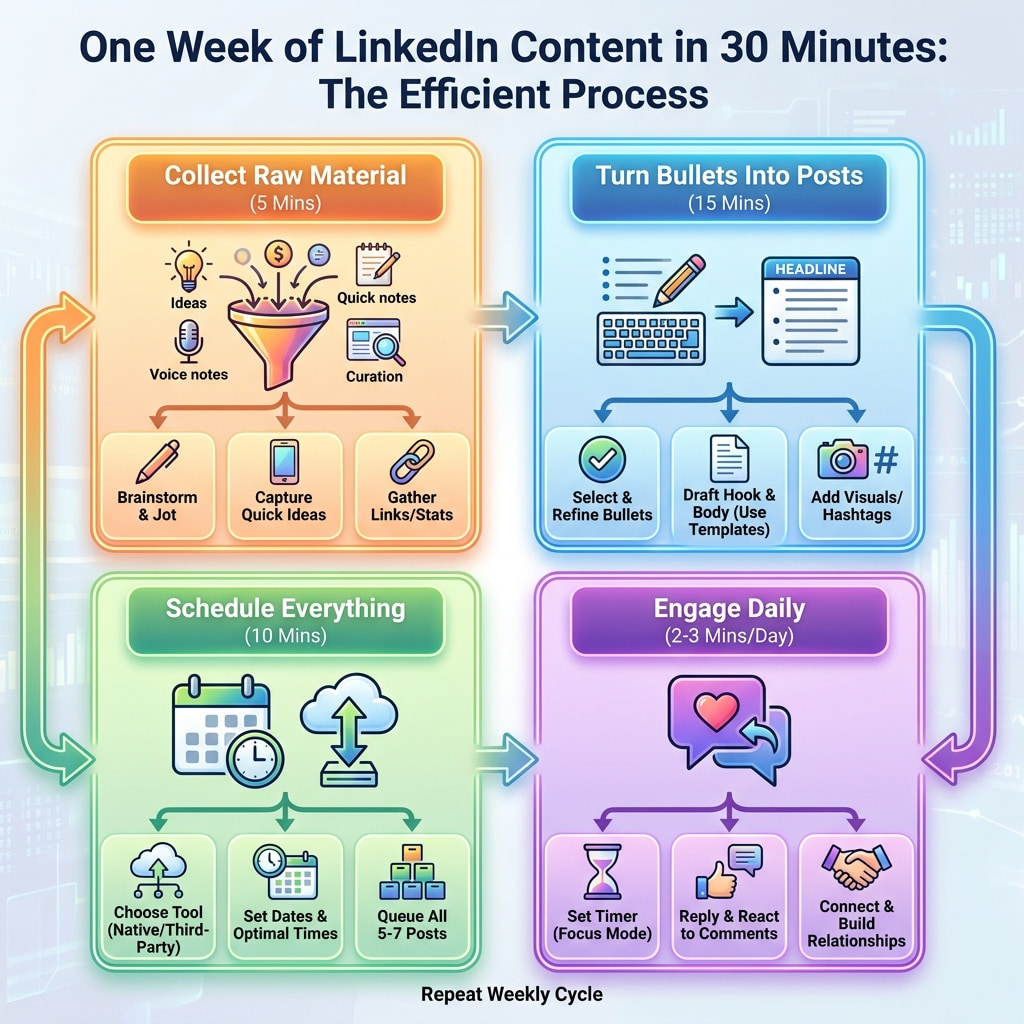
Here's the actual system. Not theory — the workflow.
Step 1: Collect Raw Material (5 minutes)
Every Sunday, dump your week into bullet points:
- What did you learn?
- What frustrated you?
- What did you build or finish?
- What conversation stuck with you?
You're not writing posts yet. You're collecting raw material.
Step 2: Turn Bullets Into Posts (15 minutes)
Take your top 2-3 bullets and expand each into a short post. Structure every post with:
- Hook — One punchy first line
- Body — 3-5 short sentences expanding the point
- Close — A question or call to engagement
Or skip this step entirely and feed your bullets to an AI content tool. More on that below.
Step 3: Schedule Everything (5 minutes)
Queue all posts for the week. Tuesday, Wednesday, and Thursday mornings (8-10am in your timezone) consistently outperform other days for student-level accounts, based on data from Buffer's 2025 Social Media Report.
Step 4: Engage for 5 Minutes Daily
Comment on 3-5 posts in your field each day. This is where most of your growth actually comes from. The algorithm treats comments as signals that you're an active participant, which boosts your own posts' reach.
Total weekly time investment: 30 minutes of creation + 25 minutes of engagement = under an hour.
The AI Tools That Make This Even Faster
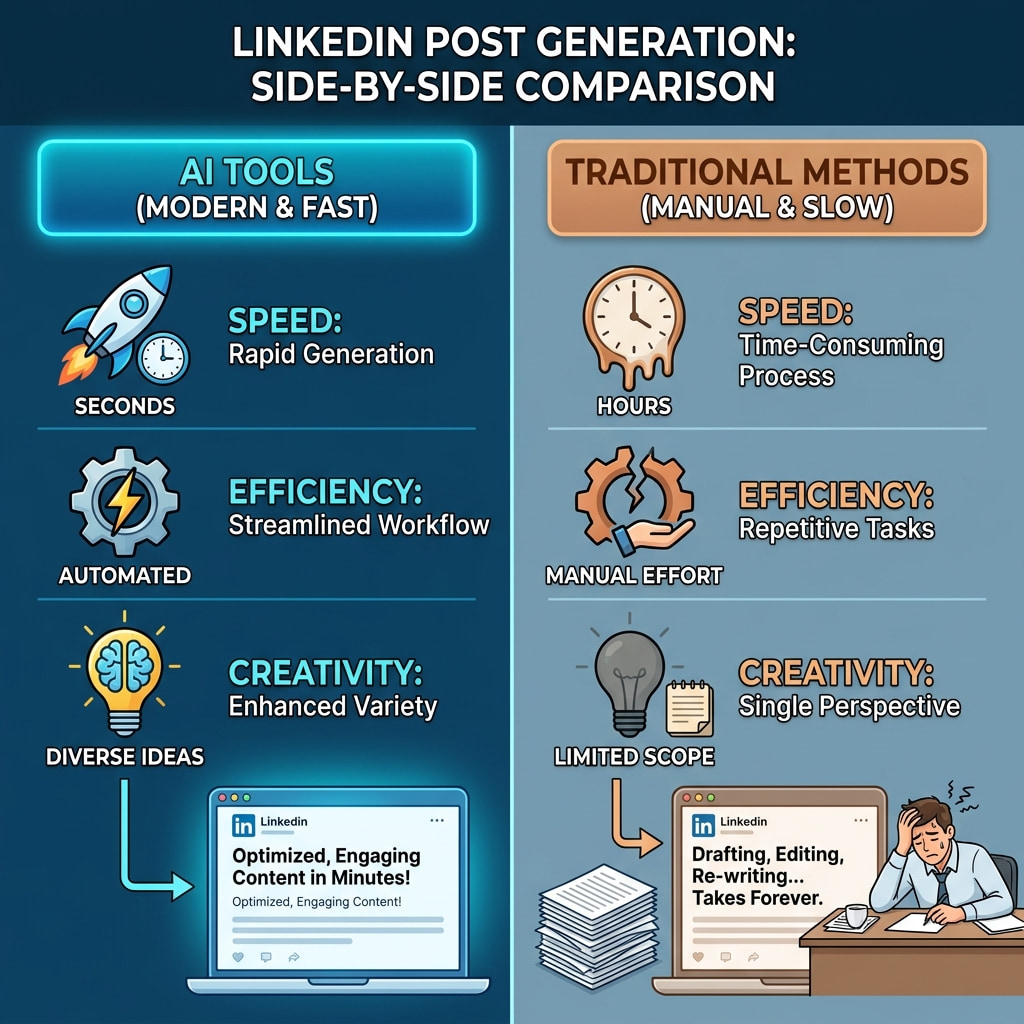
Here's where 2026 is fundamentally different from 2024. AI content tools have gotten specific enough that they can generate LinkedIn posts in your voice — not generic AI slop, but posts that sound like you wrote them.
What to Look For in an AI LinkedIn Post Generator
Not all tools are equal. The good ones:
- Learn from your examples. You paste in posts you've written (or like), and the AI generates new content in that style. No generic templates.
- Handle scheduling and publishing. Generation without distribution is just a drafts folder you'll never open.
- Cost under $5/month. You're a student. You shouldn't be paying $29/month for a content tool.
Tools Worth Considering
Trndinn — This is what I use. You feed it examples of your writing, it generates posts in your voice, and it publishes to LinkedIn on autopilot. The whole thing runs for $0.86/month. It also surfaces trending topics in your space, so you're not guessing what to write about. The free tools (LinkedIn post generator, hook generator, hashtag generator) don't even require a login if you just want to try it.
Typefully — Good for drafting and scheduling. More expensive ($12/month) and doesn't do the autopilot generation, but solid if you want more manual control.
Buffer — The classic scheduler. Free tier covers one platform. Won't generate content for you, but reliable for scheduling what you write yourself.
ChatGPT/Claude — Free or cheap for generation, but you'll need to handle scheduling separately. Good if you want to stay hands-on with every post.
The difference between using a dedicated LinkedIn tool versus a general AI assistant is the workflow integration. General AI makes you copy-paste between apps. A tool like Trndinn generates, schedules, and publishes in one flow because it's built specifically for LinkedIn presence on autopilot. Check pricing here — the student-friendly cost was the reason I tried it in the first place.
The Profile Foundation (Do This Once)
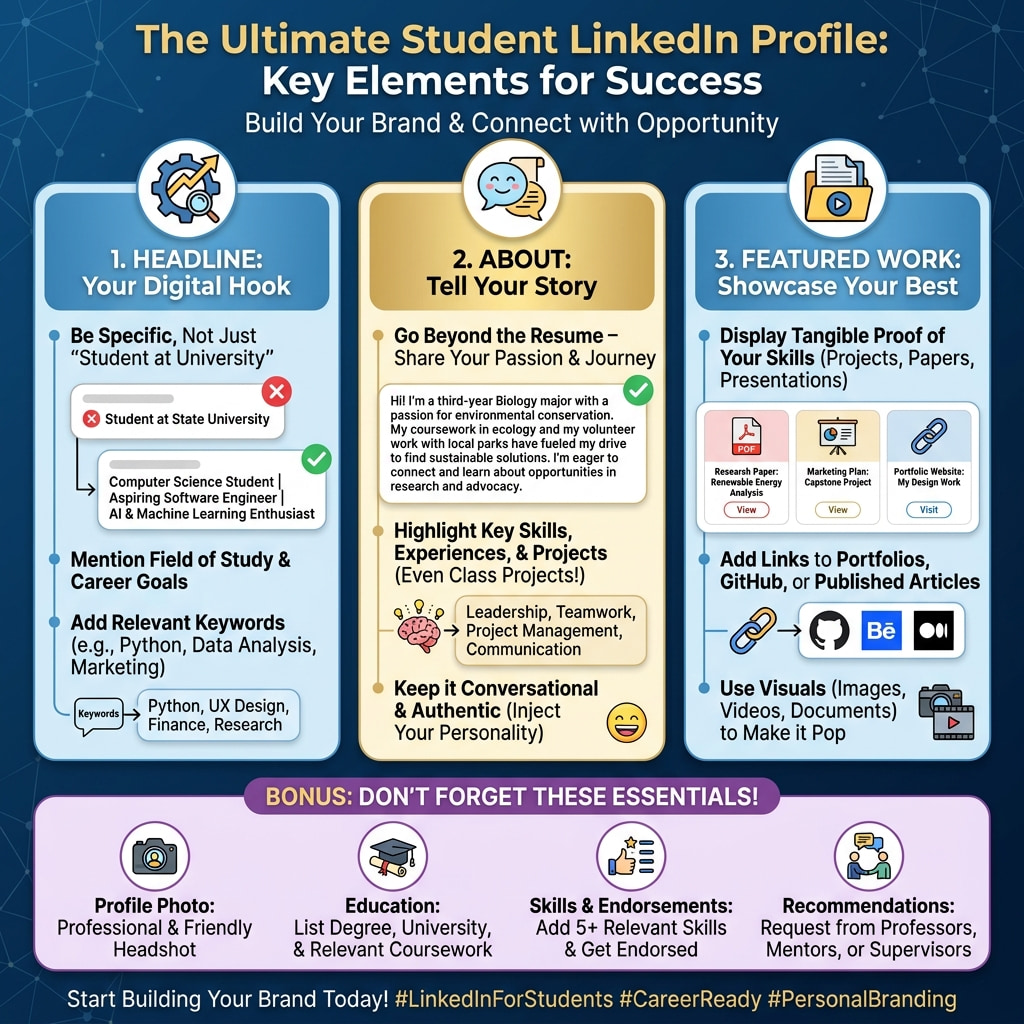
Your posts drive people to your profile. If your profile is empty, you're wasting that traffic.
Headline Formula for Students
Don't just write "Student at [University]." Use this format:
[What you do] | [What you're building/learning] | [What you want]
Example: "CS Student @ UCLA | Building ML side projects | Looking for Summer 2027 SWE internships"
About Section: 3 Short Paragraphs
- What you're studying and why you care about it
- What you've built or done (projects, internships, relevant work)
- What you're looking for (be specific — recruiters search by keywords)
Featured Section: Pin Your Best Work
Pin your top 2-3 posts and any portfolio links. This is free real estate that most students leave empty.
Common Mistakes Students Make on LinkedIn
Posting only when job hunting. Recruiters can tell when someone started posting three weeks ago just because they need a job. Build presence before you need it.
Writing for other students. Your audience should be hiring managers and professionals in your target field. Write posts they'd find valuable or interesting.
Overthinking every post. A mediocre post published beats a perfect post in your drafts. Your first 20 posts will probably get minimal engagement. That's normal. Keep going.
Copying the "LinkedIn influencer" style. You know the format — single sentence paragraphs, fake stories, "I was homeless and then I became a CEO." Don't do that. Your authenticity as a student is your advantage.
A Realistic 30-Day LinkedIn Kickstart Plan
| Week | Action | Expected Result |
|---|---|---|
| 1 | Optimize profile, publish 2 posts, connect with 50 people in your field | Profile views increase 2-3x |
| 2 | Publish 3 posts, comment on 15+ posts daily, join 2 relevant groups | First meaningful engagement |
| 3 | Publish 3 posts, start using AI tools to speed up drafting, DM 5 people for coffee chats | Connections growing, possible conversations with professionals |
| 4 | Publish 3 posts, analyze which topics got traction, double down on what worked | Consistent rhythm established, 500+ impressions per post |
By day 30, you'll have a system that takes under an hour per week. By day 90, recruiters will find you.
Key Takeaway: Building LinkedIn presence as a student in 2026 requires 2-3 posts per week, a repeatable content system, and under one hour of weekly effort. AI tools like Trndinn ($0.86/month) can generate posts from your voice samples and publish on autopilot, reducing the time investment further. The students landing opportunities aren't posting daily — they're posting consistently with a system that runs whether they're in class or not.
Quick Answers
- How often should I post on LinkedIn as a student?
- It's recommended to post 2-3 times per week to maintain visibility without overwhelming yourself. This frequency is manageable alongside academic responsibilities and helps build a consistent presence.
- Can you build LinkedIn presence without posting every day?
- Yes. Daily posting is unnecessary for students. Accounts that post 2-3 times per week with consistent quality outperform accounts that post daily for two weeks then disappear. The algorithm rewards sustained consistency over short bursts.
- Are AI LinkedIn post generators worth it for students?
- AI LinkedIn post generators are worth it when they learn from your writing style rather than producing generic content. Tools like Trndinn generate posts from your example writing for $0.86/month, making them accessible for students. The key is choosing tools that maintain your authentic voice while handling the production workload.
- What should students post about on LinkedIn?
- Students should post about three categories: what they're learning (courses, certifications, skills), what they're building (projects, hackathons, portfolio work), and what they're observing (industry trends, tool reviews, field commentary). Rotating between these three pillars prevents content fatigue.
- How long does it take to build a LinkedIn presence from zero?
- Most students see meaningful results (regular engagement, recruiter messages, connection growth) within 60-90 days of consistent posting. The first 30 days establish your rhythm. Days 30-60 build momentum. After 90 days of 2-3 posts per week, your profile becomes discoverable for relevant opportunities.
Enjoyed this article?
Get more like this in your inbox.
No spam, unsubscribe anytime.
More from the blog
All posts
How to Use ChatGPT Efficiently in 2027: 52 Prompts, Examples and Use Cases That Save Time
Most people use ChatGPT like a search box and get search box results. This guide shows the four part prompt formula, the features that save the most time, and 52 practical prompts across eight categories, plus where ChatGPT falls short and how to cover the gaps.
18 min read

How to Download and Save Instagram Reels: Complete Guide to Reels, Video Quality, Formats and Copyright
Saving a Reel sounds simple until you hit a missing Download button, a watermark you did not want, a file that will not open, or a question about whether you are allowed to use it. This guide compares every method, explains video quality and formats, and spells out what copyright and Instagram's rules mean in practice.
16 min read

Image File Formats Explained: JPG vs PNG vs WebP vs HEIC vs SVG vs GIF and When to Use Each
JPG, PNG, WebP, HEIC, SVG and GIF all store pictures, but they do it in very different ways. This guide explains how each format works, where each one wins, where each one fails, which ones social platforms accept, and how to convert between them for free.
17 min read