


Trndinn Launches a Free Instagram Reel Downloader With No Watermark and No Login
Subtitle Paste a link, get the MP4. Trndinn's newest free tool downloads any public Instagram Reel in HD, with zero watermark and zero login.
10 min read
Share this post
Summarize with AI

Trndinn just shipped a free Instagram Reel downloader that saves any public Reel as an HD MP4 in seconds, no login, no watermark, no app install. Here is how it works, who it is built for, and how to use it well.
Trndinn launches a tool that simplifies downloading Instagram Reels without watermarks or login.
The Problem With Saving Instagram Reels
Instagram was built to keep you scrolling inside the app, not to help you take content with you. There is no native "save as video file" button. Screen recording works, but it burns battery, adds compression artifacts, and often catches a chunk of your phone's status bar or a stray notification in the frame.
The alternative most people fall back on is a random downloader site. Many of these tag every video with their own logo, bury the download button behind ad redirects, or quietly ask for your Instagram username and password, which is a genuinely bad idea to hand over to a site you found through a search ad. Worse, some load several ad redirects before the download button even appears, or try to bundle in a browser extension you never asked for. None of that is worth the ten seconds it would take to just screen record the thing yourself, which is usually what people end up doing anyway.
We wanted something that respected the person using it: no credential requests, no watermark, no waiting around.
Meet Trndinn's Free Instagram Reel Downloader
The tool lives at trndinn.com/tools/instagram-reel-downloader and runs entirely in your browser. There is nothing to download or install on your end, which is a little ironic given that its whole job is helping you download something else.
This is not a side project bolted onto our platform for search traffic. It is the first release in a lineup of free tools we are building specifically for the people who create and manage content for a living, whether that is a solo LinkedIn creator or an agency running content for a dozen clients at once.
How It Works in Three Steps
- Copy the link. Open the Reel on Instagram, tap Share or the three dots, and choose Copy Link.
- Paste it into Trndinn. Drop the URL into the field on the tool page. Our engine pulls the direct MP4 source, usually in under three seconds.
- Preview and save. Check the quality, then save the MP4 straight to your device, in its original resolution, with no watermark layered on top.
It works with /reel/, /reels/, and standard /p/ post links, and it runs the same way on an iPhone, an Android phone, a Mac, a Windows PC, or a Chromebook. Because it is browser based, there is genuinely nothing to install.
What Makes This Reel Downloader Different
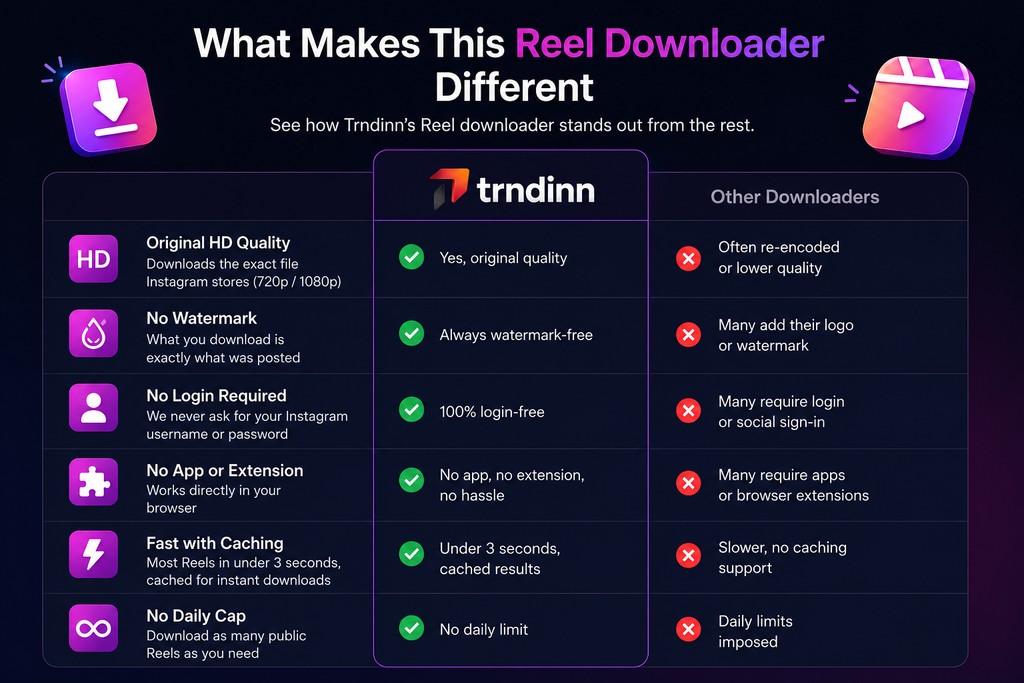
A handful of things separate this from the downloader sites most people have tried once and abandoned:
- Original HD quality. We pull the exact file Instagram stores, whether that is 720p or 1080p, without re-encoding it down to mush.
- No watermark, ever. Nothing gets stamped on top of the video. What you download is what the creator posted.
- No login required. We never ask for an Instagram username or password, and we never will. Handing your Instagram credentials to a random tool is how accounts get compromised, and we are not interested in being that risk for anyone.
- No app or browser extension. It runs in a browser tab. No APK file, no Chrome extension asking for broad permissions, no detour through an app store.
- Fast, with caching. Most Reels resolve in under three seconds, and repeat downloads of the same Reel are instant since results are cached.
- No daily cap. Download as many public Reels as you need. We apply fair-use rate limiting behind the scenes so the tool stays fast and stable for everyone, but there is no artificial "you have hit your limit for today" wall.
Why We Built Our Own Downloader Instead of Recommending One
We get asked constantly, in client calls and community threads, which Reel downloader is actually safe to use. The honest answer, for a long time, was that we did not have a great one to point people toward. Most sites in that category are ad-supported to the point of being unusable, some ask for Instagram login details that have no reason being requested by a video tool, and more than a few slap their own watermark over content that already belongs to somebody else.
Rather than keep sending people toward tools we did not fully trust, we built our own. It fits naturally into what Trndinn already does: help people create, plan, and manage content without friction. A downloader that respects the file, the creator, and the person using it felt like the right first free tool to ship, and it set the tone for the ones coming after it.
Who This Tool Is Built For
We built this with a specific set of people in mind, because they are the same people who use the rest of Trndinn every day.
- Marketing leads at growing companies who need to pull a competitor's Reel into a slide deck or a strategy review, fast, without messing around with screen recordings.
- Agency owners juggling multiple client accounts, who want to build a reference library of formats that are working right now, across accounts, without asking a junior team member to screen record on their own phone.
- Founders and creators building a personal brand on LinkedIn, who spot a Reel that would work as a native LinkedIn video with a re-cut caption, and want the raw file rather than a re-recorded copy.
- Freelance consultants and ghostwriters managing content for several clients, who need a fast way to save reference clips between calls, without adding another paid tool to an already crowded stack.
- Students and early-career creators still finding their voice, who study how established creators structure a hook, a cut, and a caption, and want to keep examples on hand to study later.
If any of that sounds like your week, the tool was built with you in it.
Smart Ways to Use a Reel Downloader
Repurpose Across Platforms
A Reel is already shot in a 9:16 frame, which happens to be the same frame TikTok and YouTube Shorts want. Instead of reshooting a concept from scratch, you can take a Reel that worked, download it, and adapt the caption and hook for the platform you are posting to. Same idea, three more places to test it, with zero extra time behind a camera.
Build a Swipe File
Good creators rarely invent a format from nothing. They study what is working: how a hook lands in the first two seconds, how a jump cut keeps attention, how a caption sets up the punchline. Saving Reels you admire into a folder, organized by hook style or industry, turns scrolling into research. Borrow structure, not scripts, and give credit where it is due.
Keep What You Love Before It Disappears
Reels vanish more often than people expect. Accounts get deactivated, creators delete old posts during a rebrand, and Instagram itself has been known to remove content without warning. If a Reel matters to your work, whether that is a client case study, a mood board reference, or a genuinely great piece of storytelling, downloading a copy means you still have it next month.
Step-by-Step: How to Download an Instagram Reel
Here is the full walkthrough, for anyone who wants it spelled out end to end.
- Find a public Reel. Open Instagram and find the Reel you want to save. This only works on public accounts. Private account content stays private, which is how it should be.
- Tap Share, then Copy Link. On mobile, this is the paper airplane icon or the three-dot menu. On desktop, you can also grab the URL straight from your browser's address bar.
- Head to the Trndinn tool page. Go to trndinn.com/tools/instagram-reel-downloader in any browser, on any device.
- Paste the link into the field. Drop the copied URL into the input box and let the tool do its work. This part usually takes less than three seconds.
- Preview the video. A preview loads so you can confirm it is the right Reel before saving anything.
- Click Save MP4. The file downloads straight to your device's Downloads folder or photo gallery, in its original quality, with no watermark added.
If a link fails to resolve, the most common reasons are that the Reel came from a private account, it has been deleted, or the link was copied from a Story or a direct message share rather than the Reel's own share menu. Grabbing the link straight from the Reel's share button almost always fixes it.
A Quick Word on Fair Use
Downloading Reels for personal, non-commercial use, things like offline viewing, research, or a private swipe file, is generally not a problem. Where it gets murky is redistribution: re-uploading someone else's Reel as your own, stripping their name off it, or using it commercially without permission. That crosses into copyright territory, and Instagram's own terms of service are clear about it too.
Our approach is simple: credit the original creator, ask before you use someone's content commercially, and treat downloaded Reels the way you would want your own content treated. Trndinn does not host or store any of the video files on our servers, either. The tool resolves a publicly available media URL and serves the file directly from Instagram's own infrastructure, nothing more. This is general guidance, not legal advice, so when in doubt about a specific commercial use, it is worth checking with the original creator directly.
What's Coming Next From Trndinn
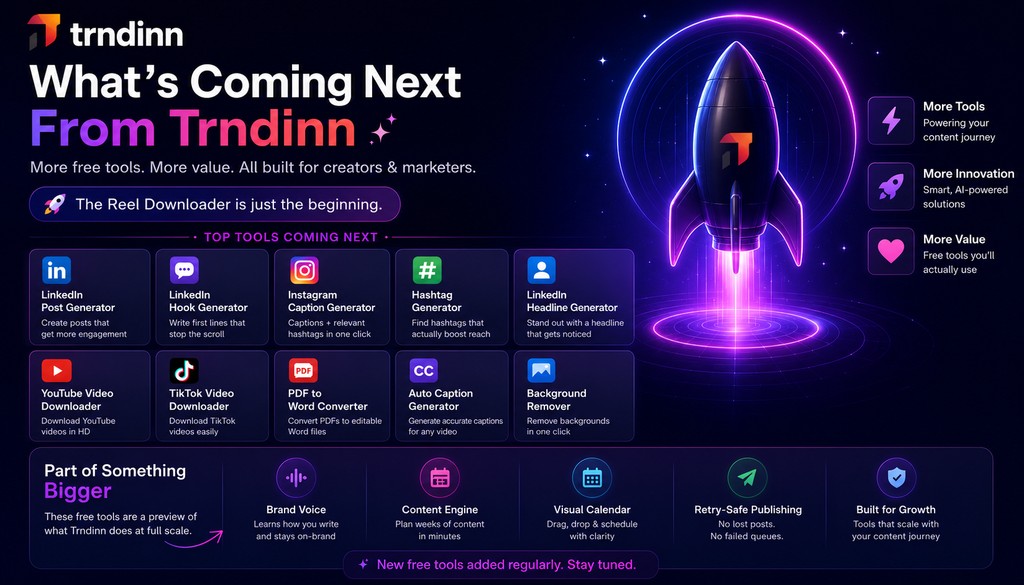
The Reel downloader is the first of several free tools we are shipping this year. Next up: a LinkedIn Post Generator trained on patterns from posts that actually perform well, a LinkedIn Hook Generator built to write first lines that stop the scroll, an Instagram Caption Generator that pairs captions with relevant hashtags, a LinkedIn Headline Generator for anyone updating their profile, and a Hashtag Generator for finding tags that genuinely move reach instead of the ones everyone already overuses.
We are treating this as the start of a running list rather than a one-off launch. Expect a steady cadence of free tools over the coming months, each one built around a specific piece of busywork that creators and marketers deal with every week, not just Reels.
Each of these free tools is a small piece of what Trndinn does at full scale: Brand Voice that learns how you write, a Content Engine that helps you plan weeks of posts at once, a visual scheduling calendar, and retry-safe publishing that makes sure a post does not just vanish into a failed queue. The free tools exist so you can feel the value before you ever consider paying for the rest.
Try It Now
If you have been screen recording Reels or handing your Instagram password to a sketchy downloader site, there is a better way sitting right here. Head to the Instagram Reel Downloader, paste a link, and see how it feels to get an HD file with zero watermark and zero login in under three seconds.
And if you are the kind of person who saves Reels because you are building something bigger, a content calendar, a client report, a personal brand, take a look at what Trndinn does beyond downloading. Start free and see the rest of the toolkit for yourself, or compare plans on our pricing page if you want the full picture first.
Quick Answers
- Is it free to download Instagram Reels with this tool?
- Yes, completely. No subscription, no credit card, and no hidden tier that unlocks HD quality later.
- Do I need to log into Instagram to use it?
- No. We never ask for an Instagram username or password, and you do not need a Trndinn account either.
- Do I need a Trndinn account to use the downloader?
- No account, no signup, no credit card. It is open to anyone with a link.
- What video quality can I download?
- Whatever quality Instagram stores the Reel in, typically 720p or 1080p, pulled without extra compression.
- Does the downloaded video have a watermark on it?
- No. What you download is the same file the creator posted, with nothing added on top.
- Can I download Reels from private accounts?
- No, and that is intentional. Only public Reels from public accounts can be accessed.
- Is there a limit on how many Reels I can download?
- There is no daily cap. We do apply fair-use rate limiting behind the scenes to keep things fast and stable for every user.
- Does this work on mobile?
- Yes. It is fully browser based and works the same way on iPhone, Android, tablets, and desktop computers.
- Does Trndinn store or host the videos I download?
- No. We do not host or cache any video files on our servers. The tool resolves a public Instagram URL and the file is served directly from Instagram's own infrastructure.
- Is downloading Instagram Reels legal?
- Personal, non-commercial use is generally fine. Redistributing or monetizing someone else's content without permission is where it becomes a copyright issue, so always credit the original creator.
Enjoyed this article?
Get more like this in your inbox.
No spam, unsubscribe anytime.
More from the blog
All posts
Why Is My LinkedIn Reach Dropping in 2026? (And How to Fix It)
If your LinkedIn posts are pulling a fraction of the views they used to, you are not imagining it and you are not alone. Reach has dropped across the platform in 2026, driven by a shift from a Relationship Graph to an Interest Graph and a unified ranking model called 360Brew. This guide breaks down what changed, five real reasons your specific reach may be down, how to diagnose which one applies to you, and what to fix first.
10 min read

How to Run a LinkedIn Marketing Agency in 2026
Running a LinkedIn agency in 2026 isn't harder because LinkedIn changed. It's harder because the agencies competing with you got faster. This playbook covers positioning, pricing, onboarding, a repeatable content system, and the kind of reporting that actually earns a renewal, plus why most agency churn is an operations problem wearing a strategy costume.
10 min read

Social Media for Busy Founders: A Simple System From Idea to Scheduled Post
Most founders know they should be posting. Almost none of them have the spare hours to do it the way most advice assumes. This guide covers why social media is usually the first thing busy founders drop, what it actually costs them to stay quiet, and a system, from idea capture to Brand Voice drafting to scheduling, built for people who have almost no time to spend on it.
10 min read