


15 Best Free AI Tools for Content Creators in 2026 (Tested and Ranked by Category)
From writing and research to design, video, captions, and voice, here are the 15 free AI tools worth having open in a tab in 2026, including two Trndinn built.
10 min read
Share this post
Summarize with AI

Content creation now runs on free AI tools, but most roundups either list tools nobody checked recently or bury the real limits in fine print. This guide tests and organizes 15 free AI tools by category, writing, design, video, captions, and audio, with what each one actually gives you for $0 and where the free tier stops.
Explore the top free AI tools for content creators in 2026.
15 Best Free AI Tools for Content Creators in 2026 (Tested and Ranked by Category)
Most "best free AI tools" lists are either outdated by the time you read them or written by someone who never actually opened the pricing page. Free tiers change constantly, a tool that was genuinely free six months ago might now cap you at three exports and a watermark, and last year's roundup articles rarely get updated to reflect that.
This list is different. Every tool below was checked against its current, live pricing page, and each entry states plainly what you get for $0, who it's actually good for, and where the free tier stops being enough. Fifteen tools, organized by what you're actually trying to do: write, design, edit video, add captions, or generate voice and music. Two of them are Trndinn's own, included because they solve real problems in this list honestly, not because this is our blog.
If you only read one section, make it the comparison table further down. It puts every tool's category, free tier highlight, and best use case side by side, which is the fastest way to figure out which three or four of these fifteen actually belong in your workflow, instead of trying to adopt all fifteen at once and abandoning most of them within a week.
Why This List Is Different
Every tool here meets three conditions: it has a real, ongoing free tier rather than a time-limited trial, it does something a working creator actually needs, and its current limits were checked directly against the vendor's own pricing page rather than copied from an older list. Where a free tier has a watermark, a monthly cap, or a feature locked behind a paid plan, that is stated directly instead of glossed over, because the gap between "technically free" and "actually usable" is where most roundups fall short.
Writing, Research, and Notes

ChatGPT. The free tier runs on GPT-4o-mini, with web browsing, file uploads, and support for long, complex prompts, capped at roughly 30 messages an hour. Best for turning a rough idea into a clean first draft of a caption, script, or outline, or for talking through three or four post angles before picking the strongest one. The hourly cap is the main friction point for anyone drafting several pieces back to back in one sitting.
Perplexity. The free plan pairs unlimited standard AI search with a limited number of deeper "Pro" searches each day, and every answer comes with clickable, cited sources instead of an unsourced summary. Best for fact-checking a claim, verifying a statistic before it goes into a post, or researching a topic fast without opening ten browser tabs. The daily allowance for deep research resets, so heavy researchers hit the ceiling before the day is over.
Grammarly. The free browser and desktop extension checks grammar, clarity, and tone in real time, with basic AI rewrite suggestions layered on top. Best for catching typos and awkward phrasing in captions and post copy before publishing. The deeper tone detection and plagiarism checks sit behind Grammarly's paid tier.
Notion AI. A set of free AI credits for summarizing, drafting, and translating notes comes bundled into Notion's already generous free workspace plan. Best for turning a messy content calendar or a voice-note brain dump into an organized plan. The free AI credit allowance is small enough that regular use means either paying for more or going back to writing notes manually.
Design and Images
Canva (Magic Studio). The free plan includes roughly 200 standard AI credits and 20 premium credits a month, covering Magic Write for on-brand copy plus limited Magic Design layouts and Dream Lab image generation. Best for turning a rough idea into a finished carousel, thumbnail, or quote graphic without design training, especially for creators already using Canva's templates as a starting point. The most requested features, Background Remover, Magic Eraser, and Magic Expand, all sit behind Canva Pro.
Leonardo.Ai. A generous daily free credit allowance covers generating original artwork, concept images, and stylized visuals instead of relying on stock photography. Best for creators who want a distinct visual identity for thumbnails or channel branding rather than a generic look. Getting precise composition and framing takes more prompting practice than some competitors.
PhotoRoom. The free plan handles AI background removal, producing clean, transparent PNG cutouts for product shots and portraits, with shadow effects rebuilt to match the new background. Best for e-commerce and product-focused creators who need a fast, clean cutout without opening a full photo editor. The free plan has resolution limits, so high-resolution commercial work usually needs the paid tier.
Video Editing and Repurposing
Trndinn Instagram Reel Downloader. Download any public Instagram Reel as an HD MP4, with no login and no watermark, completely free, for clips up to 1.5 minutes. Best for building a swipe file of formats that work or pulling a clip to repurpose on another platform. It only works on public accounts, which is intentional.
CapCut. The free tier covers trimming, multi-track editing, auto-captions, and background removal on short clips, with exports up to 1080p. Best for a full video edit when you need transitions, effects, and templates in one place rather than a single-purpose tool. Some AI-heavy features and premium templates carry a small watermark or usage cap on the free plan, and the app is unavailable in a handful of regions, including India.
Opus Clip. The free-forever plan processes up to 60 minutes of source video a month, auto-reframing long videos into vertical clips with AI captions built in. Best for podcasters and YouTubers turning one long recording into several short clips. Free exports carry a watermark and expire after 3 days if you forget to download them.
Descript. The free plan includes about 1 hour of AI transcription a month and a text-based editor that lets you cut video by deleting words from a transcript. Best for interview-style or talking-head content where the real editing pain point is finding the right moment, not adding effects. Free exports are capped at 720p and carry a watermark.
Captions, Subtitles, and Audio
Trndinn Auto Subtitle Generator for Videos. Transcribes a video, syncs captions word by word, and burns in one of six trending styles like Hormozi or MrBeast, free, with no login and no watermark, across 99+ languages. Best for making Reels and Shorts watchable with the sound off, which covers the vast majority of mobile viewers. The free tier caps clips at 1.5 minutes and 100 MB.
ElevenLabs. The free plan gives 10,000 characters a month, roughly 10 minutes of generated speech, across a full library of AI voices. Best for voiceovers on faceless content or testing how a script sounds out loud before committing to it. Free-tier audio requires attribution to ElevenLabs and is not licensed for commercial use.
Suno. The free tier generates a handful of original AI songs a day from a text prompt describing genre, mood, or lyrics. Best for background music that will not trigger a copyright claim, unlike dropping a popular song under a Reel. The daily generation limit means saving the good results as you go, since regenerating burns through the allowance fast.
Multimodal Assistants
Google Gemini. A free AI assistant with built-in image generation, capable of both natural conversation and fast visual creation from a single prompt. Best for creators who want one tool that can brainstorm a caption and generate a supporting image without switching apps. Free usage is rate-limited during high-traffic periods, and the most advanced generation modes are reserved for paid tiers.
Quick Comparison Table
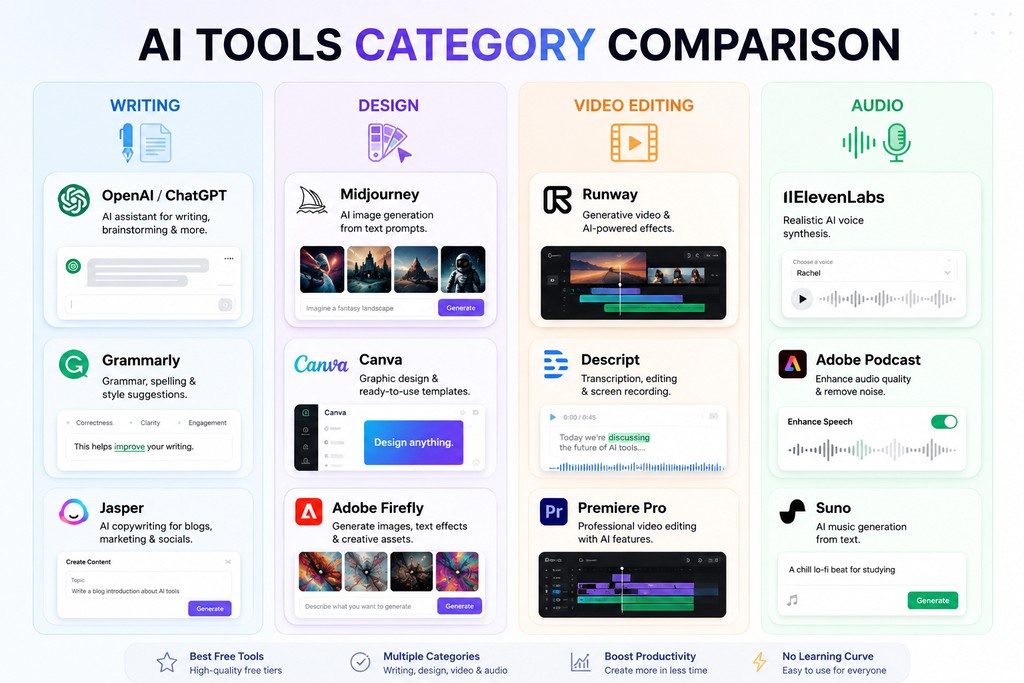
| Tool | Category | Free Tier Highlight | Best For |
|---|---|---|---|
| Trndinn Instagram Reel Downloader | Video | Unlimited HD downloads, no watermark | Swipe files, repurposing |
| Trndinn Auto Subtitle Generator | Captions | 6 styles, 99+ languages, no watermark | Sound-off viewers |
| ChatGPT | Writing | GPT-4o-mini, ~30 msgs/hour | Drafts and outlines |
| Perplexity | Research | Unlimited standard search | Fact-checking |
| Grammarly | Writing | Real-time grammar and clarity checks | Proofreading copy |
| Notion AI | Notes | Limited free AI credits | Organizing a content plan |
| Canva Magic Studio | Design | ~200 AI credits/month | Carousels and thumbnails |
| Leonardo.Ai | Images | Generous daily credits | Original artwork |
| PhotoRoom | Images | Free background removal | Product and portrait cutouts |
| CapCut | Video | Full editor, 1080p export | Complete video edits |
| Opus Clip | Video | 60 min/month processing | Long-to-short clipping |
| Descript | Video | 1 hour transcription/month | Talking-head editing |
| ElevenLabs | Audio | 10,000 characters/month | Voiceovers |
| Suno | Audio | Daily free song generations | Original background music |
| Google Gemini | Multimodal | Free chat plus image generation | Quick brainstorming |
How to Build a Free Content Workflow From This List
The real value in a list like this shows up when the tools are chained together instead of used one at a time. A realistic free workflow for a single short-form video might look like this: research the angle in Perplexity, draft the script in ChatGPT, generate a voiceover in ElevenLabs if the video is faceless, edit the raw footage in CapCut or Descript, add subtitles with Trndinn's Auto Subtitle Generator so it holds attention with the sound off, and design a matching thumbnail or carousel version in Canva.
That is six free tools and zero dollars spent, but it is also six separate tabs, six separate exports, and six separate places a file can get lost or a version can go stale. Scale that same pattern across an agency managing content for ten clients, each with its own brand voice and approval chain, and the tool-switching cost stops being a minor annoyance and starts eating a real chunk of the week. This is precisely the gap Trndinn's own platform is built to close on the publishing side, connecting drafting, brand voice, and scheduling into one flow once the free tools above have done the creative heavy lifting. The free tools get you to a finished asset. What happens after that, getting it published consistently without losing the thread, is a separate problem worth solving too.
A Note on Free Tiers Changing
Free plan limits shift often, sometimes month to month, as these companies adjust pricing and test what usage they can sustain without a subscription. Every limit listed above reflects what was live at the time of writing, but it is worth checking a tool's current pricing page before building a workflow that depends on a specific number staying fixed. A few of these tools, Opus Clip and Descript in particular, have changed their free-tier limits more than once in the past year alone. The safest approach is to treat every number in this article as a snapshot rather than a permanent promise, and to build any recurring workflow with a small buffer in case a monthly cap gets tighter before it gets looser.
Try Trndinn's Free Tools
Two of the fifteen tools above are Trndinn's own, and they are built around the same principle as the rest of this list: a real free tier, not a disguised trial. The Instagram Reel Downloader and the Auto Subtitle Generator both work with no login and no watermark, and they are the first two tools in a growing lineup built specifically for people who create content for a living, with an Instagram Caption Generator, a LinkedIn Post Generator, and several more on the way.
If you're stitching several of these free tools together already, start free with Trndinn to see how drafting, brand voice, and scheduling connect on the other side of the workflow, or compare plans if you want the full picture first.
Quick Answers
- What are the best free AI tools for content creators in 2026?
- The strongest free options span every stage of content creation: ChatGPT and Grammarly for writing, Canva and Leonardo.Ai for design, CapCut and Opus Clip for video editing, and Trndinn's Instagram Reel Downloader and Auto Subtitle Generator for downloading and captioning short-form video, all with genuine, ongoing free tiers rather than time-limited trials. The right combination depends on the type of content being produced, a podcaster's stack looks different from a LinkedIn creator's stack, but these eight cover the most common needs.
- Are these AI tools actually free, or just free trials?
- All 15 tools have an ongoing free tier that does not expire, though most cap usage in some way, a monthly credit limit, a watermark on exports, or a resolution cap. None of them require a credit card to start using the free tier, which is one of the criteria used to select tools for this list in the first place.
- Which free AI tool is best for editing short-form video?
- CapCut is the strongest all-around free video editor for full edits with transitions and effects. Opus Clip is better specifically for turning one long video into several short clips. Descript is the better choice when the main task is trimming a talking-head video by editing the transcript.
- Do I need to pay for a tool to add captions to my videos?
- No. Trndinn's Auto Subtitle Generator for Videos adds AI-synced captions in six trending styles for free, with no watermark and no login required, for clips up to 1.5 minutes.
- What is the best free AI tool for generating images?
- Leonardo.Ai offers the most generous daily free credit allowance for original artwork and stylized visuals. Canva's Dream Lab is a solid option if you are already designing inside Canva and want image generation in the same workflow.
- Is there a free AI tool for voiceovers?
- ElevenLabs offers a free plan with 10,000 characters a month, roughly 10 minutes of generated speech, though free-tier output requires attribution and is not licensed for commercial use.
- How often do free AI tool limits change?
- Fairly often. Several tools on this list, including Opus Clip and Descript, have adjusted their free-tier limits within the past year, so it is worth checking a tool's current pricing page before relying on a specific limit staying the same.
- Can these free tools replace a paid content platform entirely?
- For occasional or light use, yes. For anyone publishing consistently across multiple platforms, the free tools handle individual creative tasks well, but stitching six or seven separate apps together for every single post becomes its own time cost, which is the gap a connected platform like Trndinn is built to close.
Enjoyed this article?
Get more like this in your inbox.
No spam, unsubscribe anytime.
More from the blog
All posts
Why Is My LinkedIn Reach Dropping in 2026? (And How to Fix It)
If your LinkedIn posts are pulling a fraction of the views they used to, you are not imagining it and you are not alone. Reach has dropped across the platform in 2026, driven by a shift from a Relationship Graph to an Interest Graph and a unified ranking model called 360Brew. This guide breaks down what changed, five real reasons your specific reach may be down, how to diagnose which one applies to you, and what to fix first.
10 min read

How to Run a LinkedIn Marketing Agency in 2026
Running a LinkedIn agency in 2026 isn't harder because LinkedIn changed. It's harder because the agencies competing with you got faster. This playbook covers positioning, pricing, onboarding, a repeatable content system, and the kind of reporting that actually earns a renewal, plus why most agency churn is an operations problem wearing a strategy costume.
10 min read

Social Media for Busy Founders: A Simple System From Idea to Scheduled Post
Most founders know they should be posting. Almost none of them have the spare hours to do it the way most advice assumes. This guide covers why social media is usually the first thing busy founders drop, what it actually costs them to stay quiet, and a system, from idea capture to Brand Voice drafting to scheduling, built for people who have almost no time to spend on it.
10 min read